One Workflow. Every Step Connected by AI.
AI for contractors that carries one job from plans to final invoice. Scope, takeoffs, bids, schedules, daily logs, and billing all feed each other, so nothing gets retyped and every number traces back to the plans..

The question
Why not just use ChatGPT or Claude?
General-purpose AI can give you a takeoff or an estimate, often as a spreadsheet. But it is a standalone file. It is not connected to your bill of materials, purchase orders, bids, budget, schedule, or invoices, it knows nothing about what happens once the job starts, and nothing ties a number back to the spot on the drawings it came from.
KonstructIQ is built the other way around. Every step produces structured, traceable output that the next step can use, from the first plan upload through the daily work of running the job. You review and edit the estimate, and once you have, it is ready to send to your client. The number you generated in the first few minutes is the same number carried all the way to the invoice.
The chain
One job, one connected system
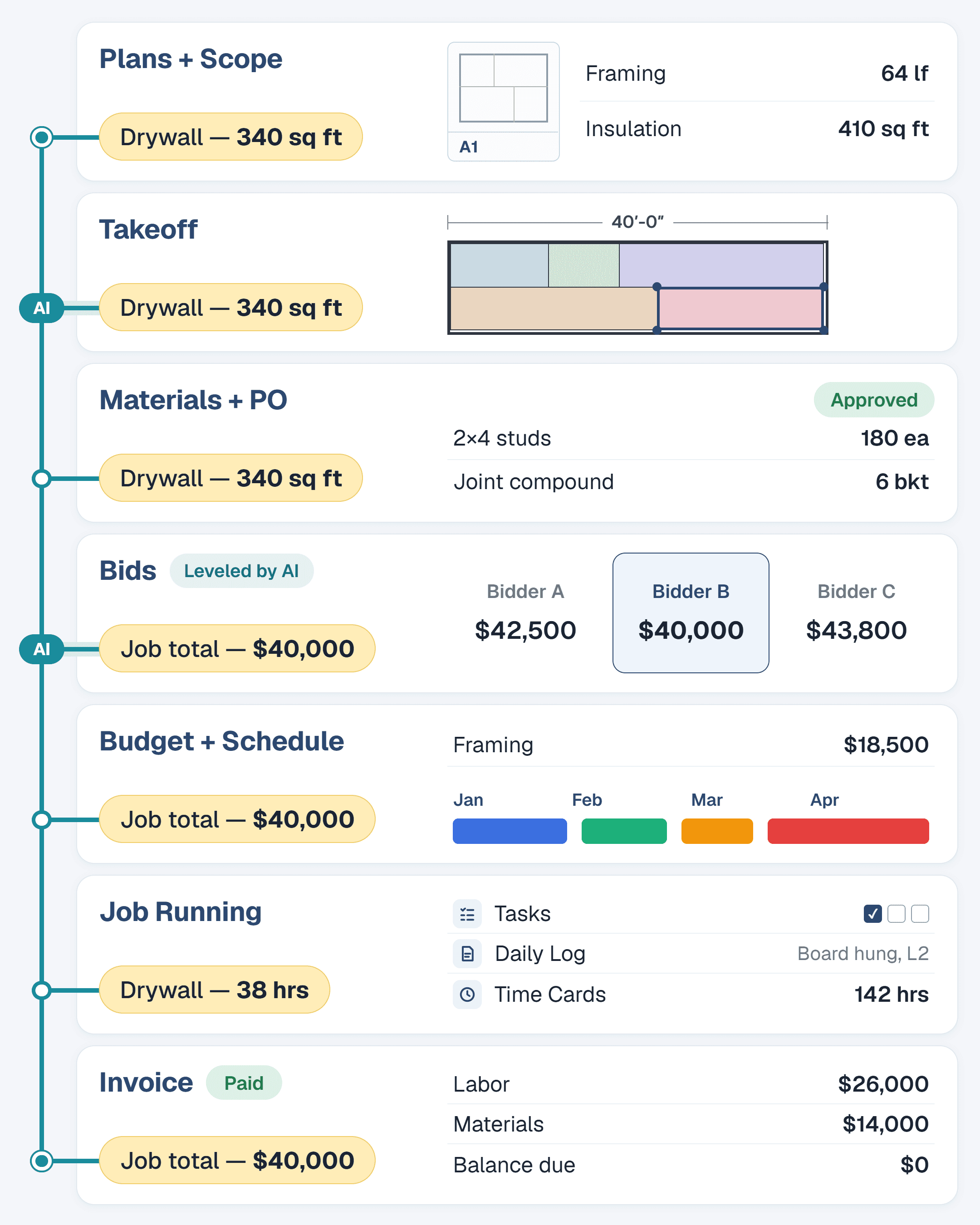
Each step below is generated from the one before it, and each links to its own page. The first phase wins and plans the job. The second runs it.
Win and plan the job
1
Read the plans
Upload a plan set and the AI reads every sheet together as one connected set, not page by page.

2
Generate the scope and takeoff
The plans become a structured scope of work and an AI takeoff, with each quantity tied back to the drawings.

3
Generate the bill of materials
Scope items become a bill of materials automatically, so material lists are built from the same source as your takeoff.

4
Generate purchase orders
The bill of materials becomes purchase orders, ready for review and signature.

5
Generate and level bids
Send scope or estimate details out for bids and bring the responses back into the same job. The AI then levels the bids, putting every response on the same scope so you can compare them like for like and see what each one includes, excludes, or misses.

6
Generate the estimate and budget
The scope becomes a priced estimate with a budget attached, then you refine it by talking to it in plain language.

7
Create the schedule
The estimate becomes a project schedule, so timing is built from the same scope you priced.

Run the job
8
Assign tasks
Once the schedule is set, tasks are assigned to your crew and subcontractors so everyone knows what is due and when.

9
Generate daily logs from photos
Upload job site photos and the AI writes the daily log, with a summary of what is actually in the photos and the weather pulled from the project location.

10
Keep change orders and the schedule current
What the daily logs show can drive change orders and schedule updates, so the plan stays current as the job changes instead of drifting from reality.

11
Track time
Crew time cards are turned in and tracked in the same system as the job.

12
Create bills and invoices
Budget items drive the bills you pay and the invoices you send, so the money side matches the plan from day one.

Why you can trust what flows
Numbers you can carry forward
A chain is only as good as its first link. If the numbers at the start are guesses, connecting everything just spreads the guesses faster. So we do not ask one AI model to do everything.
Code counts and measures.
Counts, measurements, and math come from code that reads the plans directly, so the same plans give the same answer every time.
AI handles judgment.
Models make the calls that need judgment, like which items a trade needs and what a note on the drawings means. They fill structured rows the system builds. Anything a model invents that the drawings do not support is dropped.
Every number traces back.
Each quantity points to a spot on your drawings, so you can check where it came from instead of taking it on faith.
Uncertain lines are flagged.
Lines the system is less sure of are marked as drafts for you to review, and when the plans do not contain enough information, it says so instead of guessing.
You always review the estimate before it goes anywhere. The system is built to make that review fast and specific.
Why it matters
Estimates that used to take hours start in minutes
Plans go in, scope comes out. The manual work of reading drawings and writing line items is handled by the AI.
Fewer missed
scope items
AI reads consistently. It doesn’t skip a room because it’s late or miss a fixture because the drawing is small.
Less admin on
the back office
Bill processing, PO extraction, and daily log generation all reduce the manual entry work that happens after the field work is done.
A platform that gets better over time
A platform that gets better over time
FAQ
Common questions about AI in KonstructIQ
See the whole job, connected.
From the first plan upload to the final invoice, see how one AI system carries the same numbers through every step of the job.