Construction Purchase Orders
Issue branded purchase orders to subs and vendors — AI fills them from vendor quotes. Vendor signs via secure link. Convert approved POs to bills in one click.
Core Features
How KonstructIQ handles purchase orders
AI fills the PO from vendor quotes
Drop in any vendor quote PDF or image. AI extracts the vendor, line items, due date, and scope of work — with confidence scores on every field. Edit any extracted field before the PO is finalized.
Vendor matching
Three-pass matching against your existing contacts: exact email, exact phone, then fuzzy business-name match. Create a new vendor inline if no match exists.
Budget line item links
Each PO line can link to a budget line item so committed costs stay tied to the right scope. Three-way match support: PO commitment, bill receipt, payment recorded — all linked.

Vendor signs via secure link
Send the PO by email. Vendor opens via a magic-link guest portal — no login required. Digital signature capture stored with the PO record. Decline workflow captures a reason for clean record-keeping.
One click to convert to a bill
Once work is done and the vendor invoices, turn the PO into a bill in seconds. Bill inherits the PO's line items, vendor, and amounts. Linked Bills table on the PO shows every bill created from it.
QuickBooks sync
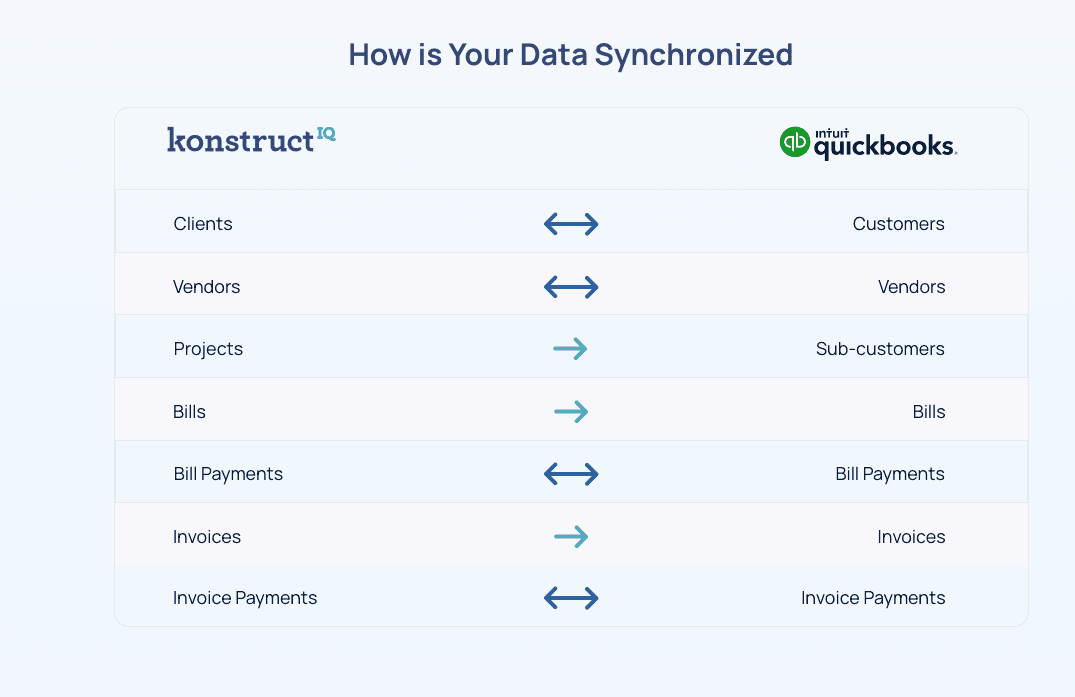
Bills and bill payments created from POs sync to QuickBooks Online — keeping your books clean after conversion.
Core Features
How KonstructIQ handles purchase orders
AI fills the PO from vendor quotes
Drop in any vendor quote PDF or image. AI extracts the vendor, line items, due date, and scope of work — with confidence scores on every field. Edit any extracted field before the PO is finalized.
Vendor matching
Three-pass matching against your existing contacts: exact email, exact phone, then fuzzy business-name match. Create a new vendor inline if no match exists.
Budget line item links
Each PO line can link to a budget line item so committed costs stay tied to the right scope. Three-way match support: PO commitment, bill receipt, payment recorded — all linked.
Vendor signs via secure link
Send the PO by email. Vendor opens via a magic-link guest portal — no login required. Digital signature capture stored with the PO record. Decline workflow captures a reason for clean record-keeping.
One click to convert to a bill
Once work is done and the vendor invoices, turn the PO into a bill in seconds. Bill inherits the PO's line items, vendor, and amounts. Linked Bills table on the PO shows every bill created from it.
QuickBooks sync
Bills and bill payments created from POs sync to QuickBooks Online — keeping your books clean after conversion.
Core Features
How KonstructIQ handles purchase orders
AI fills the PO from vendor quotes
Drop in any vendor quote PDF or image. AI extracts the vendor, line items, due date, and scope of work — with confidence scores on every field. Edit any extracted field before the PO is finalized.
Vendor matching
Three-pass matching against your existing contacts: exact email, exact phone, then fuzzy business-name match. Create a new vendor inline if no match exists.
Budget line item links
Each PO line can link to a budget line item so committed costs stay tied to the right scope. Three-way match support: PO commitment, bill receipt, payment recorded — all linked.
Vendor signs via secure link
Send the PO by email. Vendor opens via a magic-link guest portal — no login required. Digital signature capture stored with the PO record. Decline workflow captures a reason for clean record-keeping.
One click to convert to a bill
Once work is done and the vendor invoices, turn the PO into a bill in seconds. Bill inherits the PO's line items, vendor, and amounts. Linked Bills table on the PO shows every bill created from it.
QuickBooks sync
Bills and bill payments created from POs sync to QuickBooks Online — keeping your books clean after conversion.
FAQ
Common questions about purchase orders
Can I create a PO without a vendor quote PDF?
Does the vendor need an account to sign the PO?
How do PO line items connect to the project budget?
Can I see all bills created from a PO?
Does PO data sync to QuickBooks?
FAQ
Common questions about purchase orders
Can I create a PO without a vendor quote PDF?
Does the vendor need an account to sign the PO?
How do PO line items connect to the project budget?
Can I see all bills created from a PO?
Does PO data sync to QuickBooks?
FAQ
Common questions about purchase orders
Can I create a PO without a vendor quote PDF?
Does the vendor need an account to sign the PO?
How do PO line items connect to the project budget?
Can I see all bills created from a PO?
Does PO data sync to QuickBooks?
From vendor quote to signed PO to bill — without re-keying anything.
See how KonstructIQ's purchase order workflow keeps committed costs connected to your project budget.
From vendor quote to signed PO to bill — without re-keying anything.
See how KonstructIQ's purchase order workflow keeps committed costs connected to your project budget.
From vendor quote to signed PO to bill — without re-keying anything.
See how KonstructIQ's purchase order workflow keeps committed costs connected to your project budget.