Construction Invoicing Software
From itemized progress bills to flat-fee jobs — generate invoices directly from your budget, schedule milestone payments, and know exactly when your client opened it.
Problem
Most contractors are invoicing from scratch every time
The estimate is done, the job is underway, and now someone has to rebuild the numbers in a separate invoice. Line items get re-typed, math gets redone, and somewhere in the process things don't match. Then the invoice goes out and sits. No one knows if the client opened it.
Problem
Most contractors are invoicing from scratch every time
The estimate is done, the job is underway, and now someone has to rebuild the numbers in a separate invoice. Line items get re-typed, math gets redone, and somewhere in the process things don't match. Then the invoice goes out and sits. No one knows if the client opened it.
Problem
Most contractors are invoicing from scratch every time
The estimate is done, the job is underway, and now someone has to rebuild the numbers in a separate invoice. Line items get re-typed, math gets redone, and somewhere in the process things don't match. Then the invoice goes out and sits. No one knows if the client opened it.
Core Features
How KonstructIQ handles invoicing
Two invoice styles
Itemized invoices pull line items straight from the project budget — labor, materials, fees, taxes, and discounts included. Flat-fee invoices auto-create a single-line bill for simpler jobs. Switch between them per invoice without rebuilding anything.
Budget to invoice in one click
Generate an itemized invoice from any active budget with all line items pre-loaded. No re-entry, no reformatting. The math that went into your estimate is the same math on your invoice.
Change order to invoice
Approved change orders convert directly to invoices — line items, quantities, costs, and profit structure all carry over. Multiple change orders can reference the same budget without conflict.
Payment schedules
Distribute your invoice total across milestone dates using percentages or fixed amounts. Schedules auto-recalculate when totals change. Track status from Scheduled through Paid on every milestone.
Engagement tracking
Every invoice send is stamped with engagement data. See when the client received it, opened it, and clicked through — without any third-party tool.
QuickBooks sync
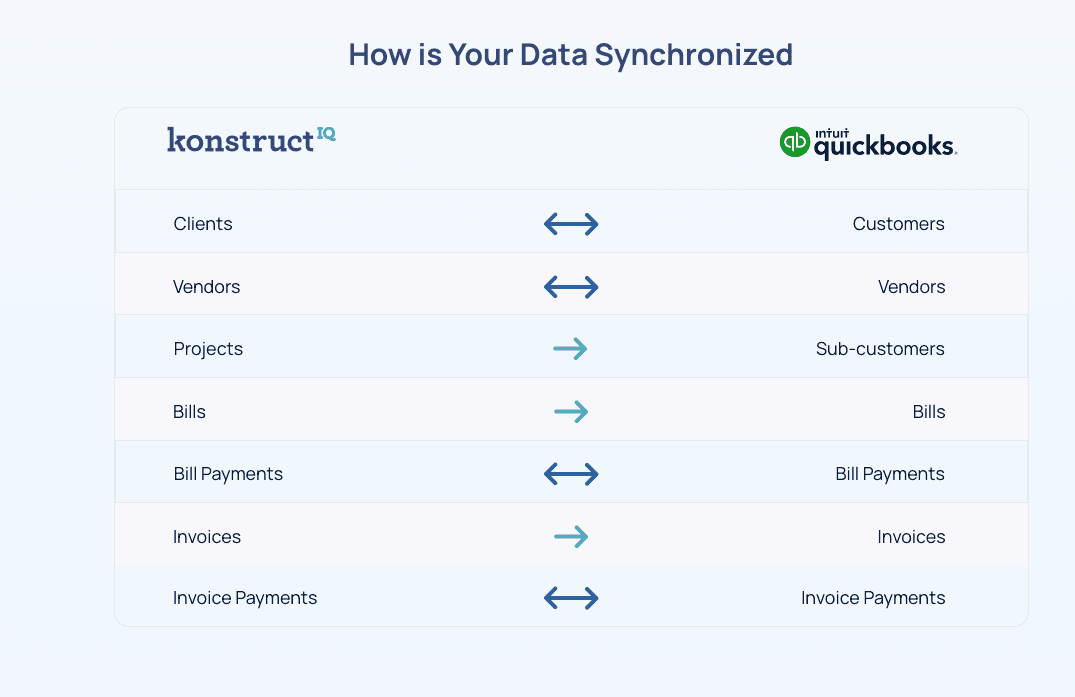
Invoice, bill, vendor, and payment objects sync with QuickBooks Online. Your job financials and your accounting stay aligned without manual export.
Core Features
How KonstructIQ handles invoicing
Two invoice styles
Itemized invoices pull line items straight from the project budget — labor, materials, fees, taxes, and discounts included. Flat-fee invoices auto-create a single-line bill for simpler jobs. Switch between them per invoice without rebuilding anything.
Budget to invoice in one click
Generate an itemized invoice from any active budget with all line items pre-loaded. No re-entry, no reformatting. The math that went into your estimate is the same math on your invoice.
Change order to invoice
Approved change orders convert directly to invoices — line items, quantities, costs, and profit structure all carry over. Multiple change orders can reference the same budget without conflict.
Payment schedules
Distribute your invoice total across milestone dates using percentages or fixed amounts. Schedules auto-recalculate when totals change. Track status from Scheduled through Paid on every milestone.
Engagement tracking
Every invoice send is stamped with engagement data. See when the client received it, opened it, and clicked through — without any third-party tool.
QuickBooks sync
Invoice, bill, vendor, and payment objects sync with QuickBooks Online. Your job financials and your accounting stay aligned without manual export.
Core Features
How KonstructIQ handles invoicing
Two invoice styles
Itemized invoices pull line items straight from the project budget — labor, materials, fees, taxes, and discounts included. Flat-fee invoices auto-create a single-line bill for simpler jobs. Switch between them per invoice without rebuilding anything.
Budget to invoice in one click
Generate an itemized invoice from any active budget with all line items pre-loaded. No re-entry, no reformatting. The math that went into your estimate is the same math on your invoice.
Change order to invoice
Approved change orders convert directly to invoices — line items, quantities, costs, and profit structure all carry over. Multiple change orders can reference the same budget without conflict.
Payment schedules
Distribute your invoice total across milestone dates using percentages or fixed amounts. Schedules auto-recalculate when totals change. Track status from Scheduled through Paid on every milestone.
Engagement tracking
Every invoice send is stamped with engagement data. See when the client received it, opened it, and clicked through — without any third-party tool.
QuickBooks sync
Invoice, bill, vendor, and payment objects sync with QuickBooks Online. Your job financials and your accounting stay aligned without manual export.
FAQ
Common questions about construction invoicing
Do I have to re-enter estimate data to create an invoice?
Can I invoice for a change order separately?
How do payment schedules work?
Can I tell if a client has opened my invoice?
Does KonstructIQ sync with QuickBooks?
FAQ
Common questions about construction invoicing
Do I have to re-enter estimate data to create an invoice?
Can I invoice for a change order separately?
How do payment schedules work?
Can I tell if a client has opened my invoice?
Does KonstructIQ sync with QuickBooks?
FAQ
Common questions about construction invoicing
Do I have to re-enter estimate data to create an invoice?
Can I invoice for a change order separately?
How do payment schedules work?
Can I tell if a client has opened my invoice?
Does KonstructIQ sync with QuickBooks?
Stop rebuilding your estimate as an invoice.
See how KonstructIQ connects your budget, change orders, and payment schedule into one invoicing workflow.
Stop rebuilding your estimate as an invoice.
See how KonstructIQ connects your budget, change orders, and payment schedule into one invoicing workflow.
Stop rebuilding your estimate as an invoice.
See how KonstructIQ connects your budget, change orders, and payment schedule into one invoicing workflow.