QuickBooks Online Integration for Construction
Invoices, bills, vendors, and payments sync natively to QuickBooks Online — no exports, no CSV gymnastics, no double entry.
Problem
Keeping job costs and accounting in sync shouldn't be a monthly project
Most contractors are exporting from one tool, formatting for another, and reconciling the gaps at month end. Every handoff creates room for errors — and by the time the accountant sees it, the job is long over.
KonstructIQ syncs to QuickBooks Online natively. What's in the platform stays in sync with what's in your books — without manual intervention.
Problem
Keeping job costs and accounting in sync shouldn't be a monthly project
Most contractors are exporting from one tool, formatting for another, and reconciling the gaps at month end. Every handoff creates room for errors — and by the time the accountant sees it, the job is long over.
KonstructIQ syncs to QuickBooks Online natively. What's in the platform stays in sync with what's in your books — without manual intervention.
Problem
Keeping job costs and accounting in sync shouldn't be a monthly project
Most contractors are exporting from one tool, formatting for another, and reconciling the gaps at month end. Every handoff creates room for errors — and by the time the accountant sees it, the job is long over.
KonstructIQ syncs to QuickBooks Online natively. What's in the platform stays in sync with what's in your books — without manual intervention.
What Syncs
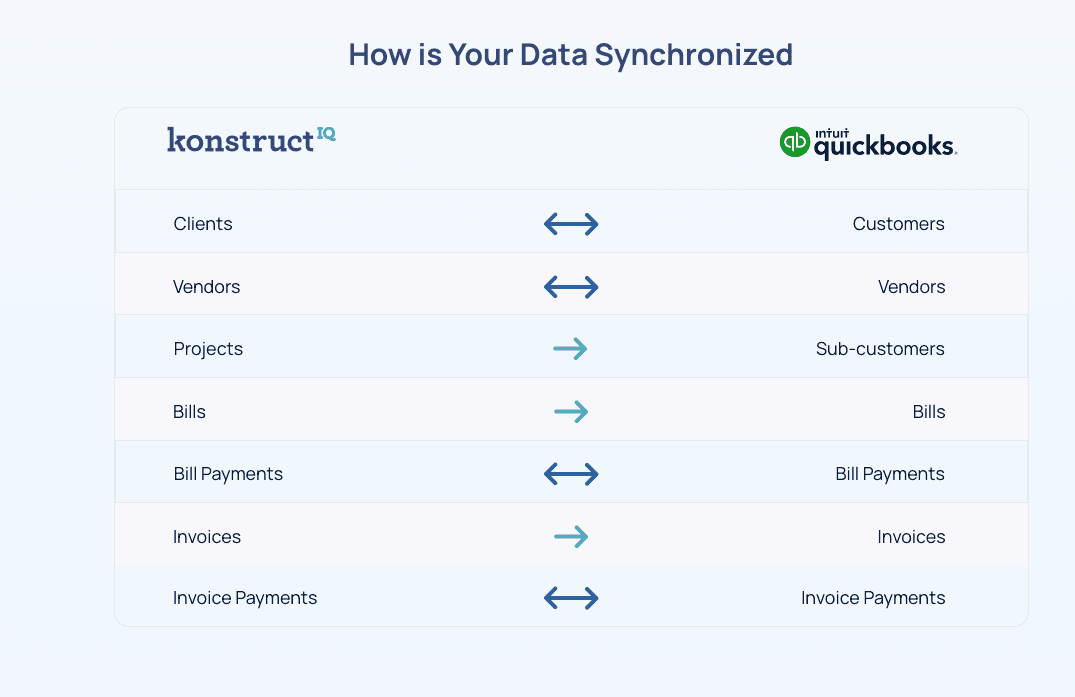
What syncs between KonstructIQ and QuickBooks
Invoices
Invoice records sync with status tracking — your AR in QuickBooks reflects the same invoices your clients are receiving from KonstructIQ.
Bills
Vendor bills processed in KonstructIQ sync as Bills in QuickBooks — including line items, vendor references, and due dates.
Vendors and subcontractors
Vendor and sub records sync as Vendors in QuickBooks automatically — keeping your contact list consistent and 1099 totals accurate.
Payments
Invoice payments and bill payments both sync — so your cash position in QuickBooks reflects actual payments processed or recorded in KonstructIQ.
What Syncs
What syncs between KonstructIQ and QuickBooks
Invoices
Invoice records sync with status tracking — your AR in QuickBooks reflects the same invoices your clients are receiving from KonstructIQ.
Bills
Vendor bills processed in KonstructIQ sync as Bills in QuickBooks — including line items, vendor references, and due dates.
Vendors and subcontractors
Vendor and sub records sync as Vendors in QuickBooks automatically — keeping your contact list consistent and 1099 totals accurate.
Payments
Invoice payments and bill payments both sync — so your cash position in QuickBooks reflects actual payments processed or recorded in KonstructIQ.
What Syncs
What syncs between KonstructIQ and QuickBooks
Invoices
Invoice records sync with status tracking — your AR in QuickBooks reflects the same invoices your clients are receiving from KonstructIQ.
Bills
Vendor bills processed in KonstructIQ sync as Bills in QuickBooks — including line items, vendor references, and due dates.
Vendors and subcontractors
Vendor and sub records sync as Vendors in QuickBooks automatically — keeping your contact list consistent and 1099 totals accurate.
Payments
Invoice payments and bill payments both sync — so your cash position in QuickBooks reflects actual payments processed or recorded in KonstructIQ.
How It Works
How the sync works
Sync status is tracked per object — Success, Failed, or Bypassed — with last-sync timestamps visible in KonstructIQ. Changes in KonstructIQ propagate to QuickBooks. Deep-links on synced records let you jump to the matching QuickBooks object in one click.
No exports. No scheduled batch jobs. No manual reconciliation steps.
How It Works
How the sync works
Sync status is tracked per object — Success, Failed, or Bypassed — with last-sync timestamps visible in KonstructIQ. Changes in KonstructIQ propagate to QuickBooks. Deep-links on synced records let you jump to the matching QuickBooks object in one click.
No exports. No scheduled batch jobs. No manual reconciliation steps.
How It Works
How the sync works
Sync status is tracked per object — Success, Failed, or Bypassed — with last-sync timestamps visible in KonstructIQ. Changes in KonstructIQ propagate to QuickBooks. Deep-links on synced records let you jump to the matching QuickBooks object in one click.
No exports. No scheduled batch jobs. No manual reconciliation steps.
FAQ
Common questions about the QuickBooks integration
What version of QuickBooks does KonstructIQ sync with?
What data syncs from KonstructIQ to QuickBooks?
Is the sync bidirectional?
Can I see if a sync failed?
Does sub data sync for 1099 purposes?
FAQ
Common questions about the QuickBooks integration
What version of QuickBooks does KonstructIQ sync with?
What data syncs from KonstructIQ to QuickBooks?
Is the sync bidirectional?
Can I see if a sync failed?
Does sub data sync for 1099 purposes?
FAQ
Common questions about the QuickBooks integration
What version of QuickBooks does KonstructIQ sync with?
What data syncs from KonstructIQ to QuickBooks?
Is the sync bidirectional?
Can I see if a sync failed?
Does sub data sync for 1099 purposes?
Your job costs and your books — always in sync.
See how KonstructIQ's native QuickBooks integration keeps your accounting current without manual export work.
Your job costs and your books — always in sync.
See how KonstructIQ's native QuickBooks integration keeps your accounting current without manual export work.
Your job costs and your books — always in sync.
See how KonstructIQ's native QuickBooks integration keeps your accounting current without manual export work.